
Bandsintown Concerts
BandsintownMusic & Audio
4.533.86K Reviews
- Version
- 10.3.2
- Installs
- 10.00M
- Age Rating
- Everyone
Screenshots
Our Review of Bandsintown Concerts
 Analysis by Appyee
I use concert apps for one simple reason: I want live music to become part of my plans before the event is sold out or forgotten. Bandsintown Concerts approaches that problem as a practical discovery and notification tool rather than as a place to stream music or create playlists. After spending time with it, I found its strongest value in turning my listening habits and artist interests into a more organized way to find nearby shows.
That distinction matters. If you are looking for a full music player, this is not the right category of app. If you want to know which artists are touring, decide which events deserve your attention, and keep concert plans from disappearing into a busy calendar, it makes much more sense. The app is free, aimed at Everyone, and comes from Bandsintown, a developer focused specifically on connecting listeners with live performances.
From a vague music interest to a useful concert plan
The creative starting point here is not making a song or editing a video. It is the moment when a listener turns a loose thought—“I would love to see that artist live”—into a realistic plan. I like that the app is built around this transition. Instead of waiting until I happen to see a tour announcement on social media, I can use it as a dedicated place to look for shows and receive notifications.
That makes the app especially useful for people whose music taste is spread across several services, playlists, and artist pages. Social feeds are good at showing what is happening right now, but they are inconsistent for long-term discovery. A tour announcement can pass by while I am busy, and a smaller venue event may never appear in my regular feed. Bandsintown Concerts gives those possibilities a more focused home.
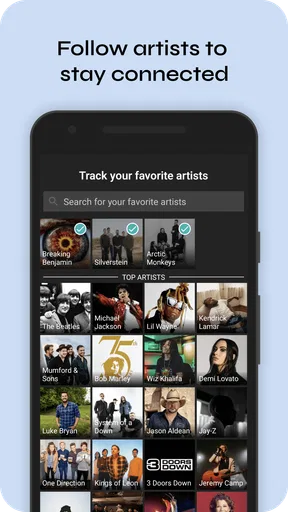
On first use, I would approach the setup with a little patience. The quality of the recommendations depends on the artists and locations I make relevant to myself. Choosing only the biggest names may produce a narrow view of my concert options, while adding every artist I have ever listened to can create unnecessary noise. My practical advice is to begin with the artists I would genuinely travel to see, then broaden the list once the notification flow feels manageable.
This is one of the app’s less obvious strengths: it can help separate music I enjoy casually from artists I want to see in person. Those are not always the same thing. An artist may be perfect for background listening but not worth a ticket, while another may become much more exciting when a live date appears nearby. Treating the app as a personal concert watchlist, rather than as another general music feed, makes it more useful.
The service has been available since April 10, 2012, so it is not a new experiment trying to squeeze concert discovery into a broader entertainment product. Its current version is 10.3.2, and the Android requirement begins with version 7.0. That broad compatibility is helpful if I am using an older phone, although the overall experience still depends on how carefully I manage alerts and artist choices.
What I do before relying on notifications
I would not simply install the app and assume every possible show will automatically become relevant. I first think about the kinds of events I actually want: local club performances, larger tours, festivals, or occasional trips to another city. That decision affects how I interpret the notifications. A person who only wants events within a short drive should be more selective than someone who regularly travels for live music.
A realistic everyday example would be a Friday evening when I am deciding what to do over the next few weeks. Rather than searching several artist websites one by one, I can check the concert-focused app for events connected to the artists I follow. If something looks promising, I can investigate the venue, date, and ticket details before committing. The app does not replace my judgment; it reduces the amount of searching needed to reach that judgment.
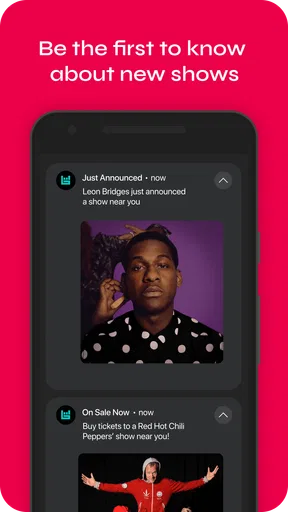
I also find it useful to treat notifications as prompts, not decisions. An alert can tell me that an artist is playing, but it cannot know whether the date clashes with work, whether the venue suits me, or whether the ticket cost fits my budget. The best workflow is to review an alert quickly, save or investigate the event if it matters, and then silence or ignore anything that does not fit my real plans.
How the app handles the making process
In a creative workflow, the “making” stage is where a rough idea becomes something usable. For this app, that means turning artist interests into a working stream of concert possibilities. I found the process more valuable when I used it actively: searching for artists I care about, reviewing what appears, and deciding which discoveries deserve follow-up.
The interface is designed around concerts, so it feels more purposeful than a general-purpose search engine for events. I do not have to begin with a venue or know the exact date of a tour. I can begin with the artist. That is a meaningful advantage when I remember who I want to see but do not know whether they are touring near me.
It is also useful in the opposite direction. Sometimes I know I want to attend live music but have no fixed artist in mind. In that situation, browsing event suggestions can turn an empty evening into a shortlist. I would still verify the practical details before buying anything, but the discovery stage becomes less dependent on luck or on following the right promoter at the right moment.
One trade-off is that recommendations are only as helpful as the context behind them. If my location is not useful, or if my artist preferences are too narrow, the app may feel quiet. That is not necessarily a failure of the concert database; it can simply mean that I have not given the discovery system enough direction. I prefer to adjust my followed artists and search habits before deciding that the app has little to offer.
Compared with social media, the main benefit is focus. Social platforms can expose me to breaking announcements and fan conversation, but they also mix concert news with everything else. Compared with checking individual artist websites, Bandsintown Concerts is faster for scanning multiple artists in one place. Compared with a general ticket marketplace, it begins with artist discovery rather than with a large catalogue of transactions. Each alternative can be better for a particular task, but this app occupies a useful middle ground between awareness and planning.
A workflow that avoids alert fatigue
My preferred routine is to use the app in two passes. First, I let it surface possibilities from artists I already care about. Then I make a deliberate second pass to decide which events deserve action. This prevents every notification from feeling equally urgent. It also keeps the app from becoming another source of digital clutter.
For example, if I receive several event notices during a week, I would group them mentally into three categories: events I would buy for immediately, events I might attend if the date works, and events I can safely ignore. That simple classification gives the notifications a purpose. Without it, even a useful concert alert can become background noise.
Another practical tip is to use the app for discovery but use the event’s official purchase route for the final transaction whenever appropriate. I want to inspect the venue, date, ticket terms, and travel requirements myself. The app helps me reach the event; it should not replace the final check that I would make before spending money.
This is also where the app may not suit everyone. If I already follow a small number of artists closely and never miss their announcements, a direct artist mailing list or venue calendar may be simpler. Bandsintown Concerts becomes more valuable when my interests are broad, my memory is unreliable, or I want one place to monitor several touring artists.
Iteration: refining what deserves my attention
Good concert discovery is iterative. My first set of preferences will not perfectly describe my live-music taste, and the app is more useful when I adjust it over time. After seeing which alerts feel relevant and which feel repetitive, I can refine the artists and types of events I want to notice.
I would judge the results by asking practical questions. Did the notifications lead me to artists I truly wanted to see? Were the events close enough to be realistic? Did I discover smaller acts I would not have found through my usual listening habits? If the answer is mostly no, I would change the inputs rather than keep scrolling passively.
The most valuable iteration is often geographic. A user may live near one city but occasionally visit another for work or family. Concert discovery can be more useful when those real-life patterns are considered, but I would avoid adding every possible location. Too wide a search area can create an attractive list of events that I will never attend, weakening the point of the alerts.
There is a similar balance with artist selection. Adding emerging acts may improve discovery, but it can also increase the number of notices. Following only established favorites keeps the feed calmer but may reduce the chance of finding a memorable smaller show. I see this as a genuine trade-off rather than a flaw: the app can support both approaches, but I have to choose how much surprise I want.
One advanced use is to treat the app as a planning layer for a season of live music. Instead of reacting to one announcement at a time, I can look across upcoming possibilities and decide which months already contain enough events. That helps avoid spending impulsively on every appealing date. It also makes travel and scheduling easier because I am comparing options rather than making isolated decisions.
Another useful habit is to revisit artists after discovering them through a show notice. If I only recognize a name vaguely, I can listen elsewhere before deciding whether the event fits my taste. This keeps the app in its proper role: it points me toward live opportunities, while my normal music services remain better suited to sampling and sustained listening.
From discovery to handoff
The handoff stage begins when I move from “this looks interesting” to “I am actually organizing my evening.” Bandsintown Concerts is strongest before and around that handoff. It helps me identify an event and gives me a reason to investigate it, but I still need to manage the details that matter in real life.
Before committing, I would check the date against my calendar, estimate travel time, confirm the venue, and review the ticket information through the relevant event or seller page. I would also consider whether the event is suitable for the people joining me. A notification is a useful starting point, not a complete itinerary.
This division of labor is important when comparing it with ticketing apps. A ticket marketplace may offer a more transaction-centered experience, especially when I already know the exact event I want. Bandsintown Concerts is better earlier in the process, when I am trying to discover what is happening and decide whether it belongs on my shortlist. For a listener who wants both discovery and purchase in one tightly controlled workflow, using two tools may feel less convenient.
I also would not use it as my only source for last-minute changes. Concert plans can involve schedule updates, venue instructions, or artist-specific announcements. Once I decide to attend, I would keep the final event information somewhere easy to check. The app can support the handoff, but responsible planning still requires attention after the initial alert.
The free price makes experimenting easy. I can try the app without turning concert discovery into another subscription decision. That matters for occasional concertgoers who may only need it during certain parts of the year. At the same time, free access does not remove the cost of the events themselves, so I would use its discovery power carefully rather than letting a steady stream of possibilities encourage unnecessary purchases.
Its broad audience rating of Everyone also makes it approachable for households where different people share an interest in live music. Still, the age label should not be mistaken for a guarantee that every concert is suitable for every attendee. Venue rules, event atmosphere, and late-night travel are separate considerations that I would check for each show.
Who will get the most from it?
I would recommend the app to listeners who enjoy live music but regularly miss announcements. It is especially practical for people with many favorite artists, people who move between cities, and anyone who wants discovery to come from artist interests instead of from a general event search.
It is also a good fit for someone building a concert habit. A new concertgoer may not know which venues to follow or which local artists are touring. Starting with artists and nearby events creates a gentler route into the live-music scene than trying to understand every venue calendar at once.
Frequent concert travelers can use it as an early planning tool, particularly when deciding which artists might justify a trip. I would still compare travel costs and ticket details separately, but having a concentrated list of possible shows can make that research more efficient.
I would be more cautious about recommending it to a person who only attends events at one favorite venue and already checks that venue’s calendar every week. In that case, a direct venue source may be faster. I would also hesitate for someone who dislikes notifications entirely, because the app’s value depends partly on being willing to review timely concert information.
Listeners who want a music player, offline listening, deep audio controls, or a replacement for a streaming library should skip it. Its purpose is live-event awareness and discovery. Expecting it to behave like a streaming service would lead to the wrong evaluation.
My verdict after using it as a concert-planning tool
Bandsintown Concerts succeeds because it focuses on a problem I genuinely have: remembering that artists I like may be performing somewhere I can reach. It gives that problem a dedicated workflow, from artist discovery to notification to event research. I especially appreciate the way it sits between passive social discovery and the more rigid process of searching for a known ticket.
Its limitations are mostly about expectations and control. Notifications can become distracting if I follow too many artists or locations. Recommendations are less useful when my preferences are vague. The app also cannot make the final planning decisions for me, and I still need to verify the event details before buying or traveling.
The service has earned a 4.5 average from around 264 thousand ratings, with more than 10 million installs, which fits my impression that it is a mature, widely used concert-discovery app rather than a niche experiment. Those figures do not make it automatically right for everyone, but they do make it easier to trust as a starting point for a regular live-music routine.
My final recommendation is straightforward: install it if you want a better chance of hearing about relevant shows before they pass you by, and spend a few minutes shaping the artists and locations you care about. Use it as the discovery and reminder layer, then apply your own judgment for tickets, travel, venue suitability, and scheduling. The best result comes when the app helps me notice opportunities without taking over the decisions.
Verdict
Strengths of Bandsintown Concerts
- Tracks concerts from favorite artists across multiple cities.
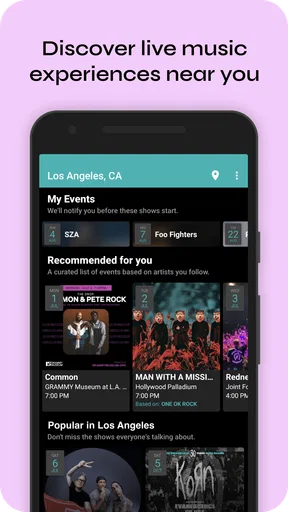
- Offers personalized event recommendations based on listening preferences.
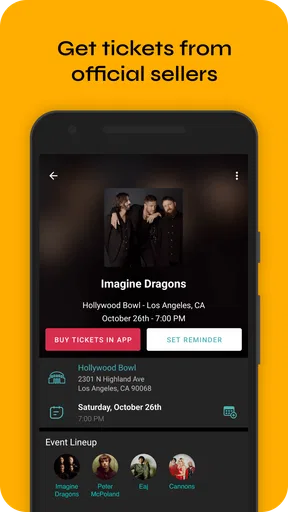
- Provides venue, date, lineup, and ticket details in one place.
- Lets users save events and receive reminders before shows.
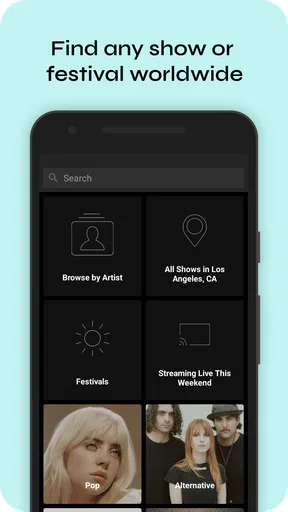
- Supports artist and festival discovery beyond mainstream performers.
Limitations of Bandsintown Concerts
- Ticket prices and service fees may vary between external sellers.
- Some event listings may contain outdated or incomplete information.
- Recommendations can feel repetitive if your music taste is narrow.
- Availability of features and events differs significantly by location.
- Frequent notifications may become distracting without careful settings.
Similar Picks in This Category
View All
YouTube Music
Google LLC4.4

Samsung Music
Samsung Electronics Co., Ltd.3.8

Spotify: Music and Podcasts
Spotify AB4.3

JioSaavn - Music & Podcasts
Saavn Media Limited4.3

Lark Player:Music Player & MP3
Lark Player Studio - Music, MP3 & Video Player4.6

StarMaker: Sing Karaoke Songs
SKYWORK AI PTE. LTD.4.3
Frequently Asked Questions
What is Bandsintown Concerts and how does it work?
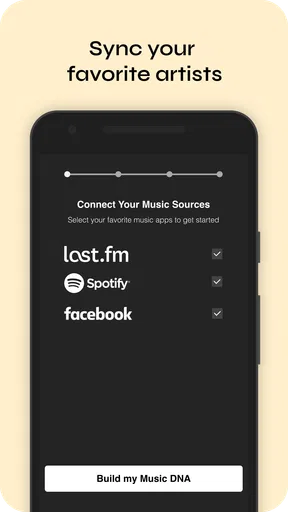
Bandsintown Concerts is an app for discovering live music events, concerts, festivals, and livestreams based on your favorite artists and location. After creating an account, you can select artists you follow, connect music services, and allow location access to receive personalized recommendations. The app also lets you browse event details, check dates and venues, and find tickets through available providers.
Can Bandsintown Concerts find shows near my location?
Yes. Bandsintown Concerts can use your selected city or device location to display nearby concerts and upcoming events. You can usually change the location manually if you are planning a trip or want to explore another area. Results depend on the availability of event information in your region, so smaller venues or local performers may not always appear immediately.
Does Bandsintown Concerts send notifications about my favorite artists?
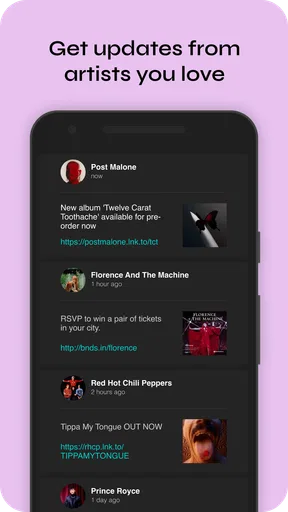
The app can notify you when artists you follow announce new concerts, add dates near you, or release other event updates. This is one of its most useful features for fans who do not want to miss ticket sales. Notifications can generally be adjusted in the app or through your phone’s system settings, allowing you to control which alerts you receive.
Can I buy concert tickets directly through Bandsintown Concerts?
Bandsintown Concerts commonly provides links to ticket sellers rather than acting as the ticket provider for every event. When you select a concert, the app may redirect you to an official venue, promoter, or third-party ticketing website to complete the purchase. Before paying, review the seller, ticket price, service fees, refund policy, and event conditions carefully.
Is Bandsintown Concerts free to download and use?
Bandsintown Concerts is generally free to download and use for discovering artists, concerts, and event recommendations. However, tickets, merchandise, venue fees, and some external services linked through the app may cost money. Availability of features can vary by country, device, and event organizer. You should also review the app’s current privacy and account requirements before signing up.
